The AI assistant for fleet operators that answers from your own data
The Axons Mobility AI assistant answers questions about your vehicles, riders and revenue in plain words, straight from your own fleet data. Get charts, tables and links to the exact page, and nothing runs until a person confirms. Try it free for 15 days.
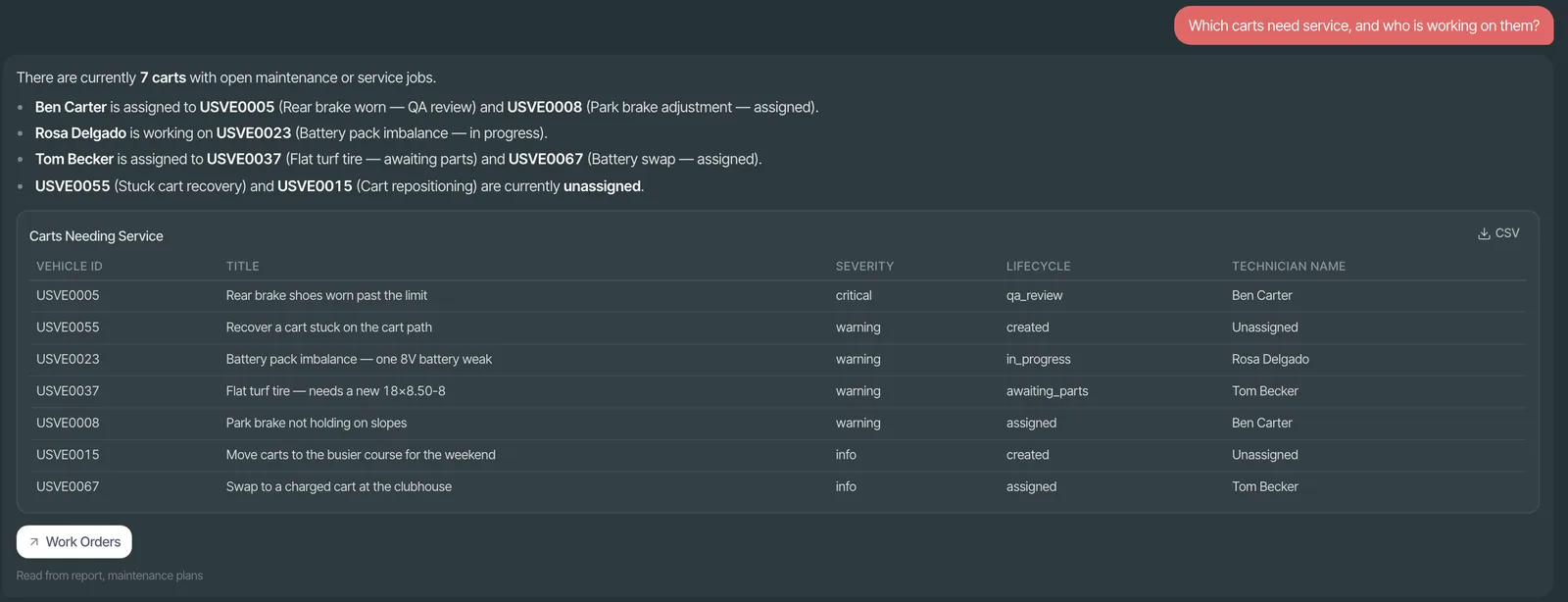
What to do next, inside your console
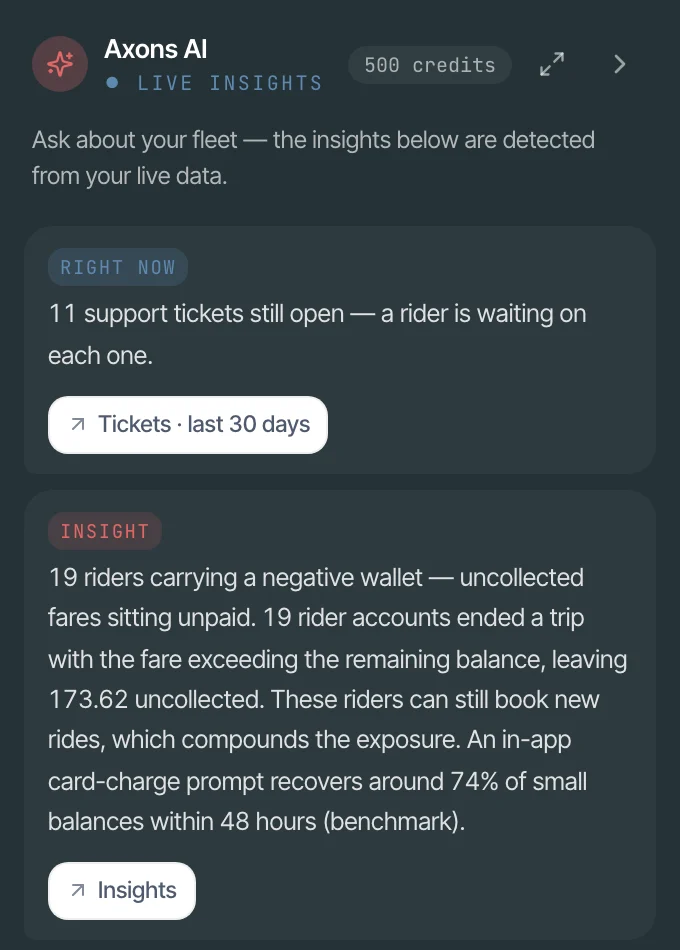
Open the assistant and it starts with a short brief: new revenue ideas and what needs attention right now. Every estimate is labelled as one. Part of the Intelligence add-on, free for fleets of up to 25 vehicles.
- Revenue InsightsIdeas from your own trips with an estimated weekly gain, then revenue before and after you act.
- Fleet IntelligenceA health score for every vehicle, and alerts that become pre-filled work orders.
- Rider IntelligenceSegments, estimated churn risk and revenue at risk, so you see who to win back first.
Works with Claude, ChatGPT and MCP apps
Prefer the AI app your team already uses? Connect it in three steps and ask about vehicles, riders and revenue right there.
- 1Copy your workspace's MCP address from the console
- 2Add it as a connector in Claude, ChatGPT or any MCP app
- 3Sign in with your own account and approve
MCP connection
Your Axons Mobility workspace
- Answers about your vehicles, riders and revenue
- Each person sees only what their role allows
- Changes need a separate confirmation
What can you ask the AI assistant?
Ask the way you would ask a colleague, right in the Operator Console. Answers come from the help pages or your own fleet data.
“How do I set up a parking zone?”
“Which e-bikes are low on battery?”
“Which riders joined in June, then stopped?”
“Which fleet earned most, this month vs last?”
“What should we do today?”
“Why is EB-2231 offline?”
Answers you can act on, not just read
Each answer comes in the form that fits the question, and it takes you straight to the rows it is about.
Links with filters applied
Charts from your real numbers
Tables, CSV and PDF
Answers in your language
Follow-up questions
Your chats on every computer
Three rules it always works under
An assistant that guesses is worse than no assistant. These rules are part of how it works, not settings you have to remember.
It says what it can't see
It follows permissions
You confirm every action
Pay for the questions your team asks
Questions to the built-in assistant use credits, and so does connecting your own AI app. See all pricing
Built-in assistant
AI assistant credits
500 free to start
500 free to start, then packs. 1 credit is 1 US cent; each type of question has a fixed price, and a failed question costs nothing.
- A fixed price for each type of question
- Warning emails before credits run low, plus spend caps
- Auto top-up, so the assistant does not stop when credits run low
Add-on
Connect your own AI
Paid with credits
Ask about your fleet in Claude, ChatGPT and other MCP apps, with each person's own permissions. Paid with AI assistant credits as you use it.
- Pay as you use it, from the same credit balance
- Each person sees only what their role allows
- Changes need a separate confirmation step
AI assistant questions
Works with the rest of Axons Mobility: Intelligence, MCP for AI Apps, Operator Console, Rider App, Integrations, Devices and Supported Vehicles.
Switching from another platform? See how Axons Mobility compares
What can the Axons Mobility AI assistant do for a fleet operator?
It answers your questions in plain words inside the Axons Mobility Operator Console. Ask how-to questions, check your numbers on vehicles, riders and revenue, get a ranked list of what needs attention today, or find out why a vehicle is offline. Answers come with links, charts, tables, CSV downloads and a PDF when you ask.
Can we connect our own Claude or ChatGPT to Axons Mobility?
Yes, with the “Connect your own AI” add-on, paid with AI assistant credits as you use it. Claude, ChatGPT or any MCP app connects to your workspace in three steps, and each person sees only what their role allows. Changes need a separate confirmation step.
Where do the AI assistant's numbers come from?
From your own Axons Mobility records. Charts and tables are drawn from your real data, and when the assistant cannot see something it says “I can't see that yet” instead of guessing.
Can the AI assistant change anything in our fleet on its own?
No. In the console it can only suggest a work order for one vehicle, or a command such as lock, unlock or restart, and nothing happens until a person presses Confirm. Commands are refused while a rider is on a trip.
How much does the AI assistant cost?
The built-in assistant uses credits. 500 free to start, then packs. 1 credit is 1 US cent; each type of question has a fixed price, and a failed question costs nothing. Bonus packs, auto top-up, low-credit warnings and spend caps keep it under control.
See Axons Mobility working on your own golf carts
Tell us about your carts and pick a time on the page. In a 30-minute video call we walk you through the console and the rider app, shaped around your fleet. Or try it free for 15 days.
Questions first? Email hello@axonsmobility.com.