Golf cart geofencing: keep carts off the pool deck and the beach
Golf cart geofencing means drawing zones on a map that carts should stay inside or out of. With Axons Mobility, a guest is warned in the app when a cart enters a no-go zone or leaves the property, and every breach is logged and shown on Ride Replay.
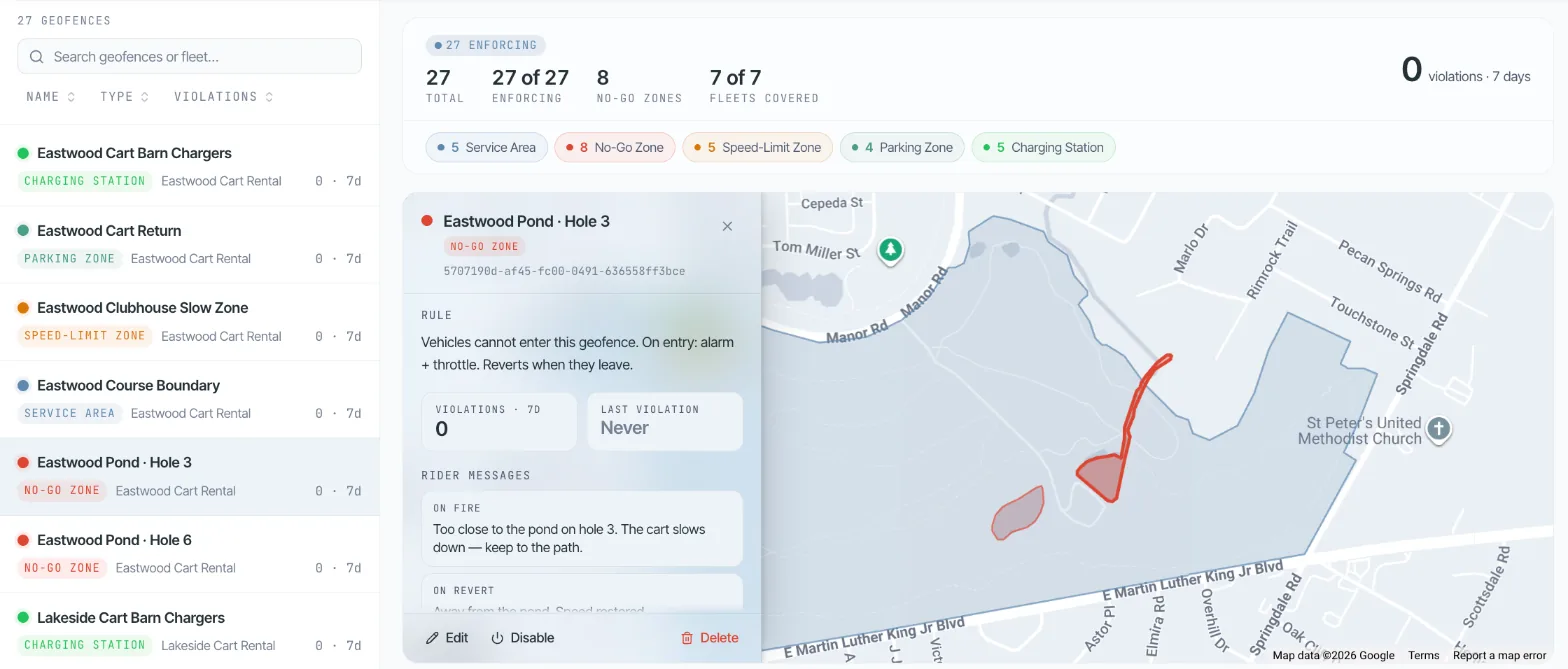
Signs don't stop a cart, and you hear about it too late
A resort doesn't want carts on the pool deck or the beach. Draw a no-go or speed-limit zone on the map: the guest gets a warning in the app, and every breach is logged.
Guests drive where the path looks easiest: across a lawn, onto the beach, past the pool. Staff find out from another guest, or from the damage.
Without a record, you can't tell who went where, or show a guest the rule they broke.
Where this happens
- Resorts and hotels
- Golf courses with ponds and greens
- Gated communities
- Campuses and business parks
How it works with Axons Mobility
Draw your zones on the map in the console, as shapes or circles: service area, no-go, speed limit, parking and charging.
Write the message guests see when they get close, for example "Too close to the pond, keep to the path".
When a cart enters a no-go zone or leaves the service area, the guest is warned in the app.
Every breach is logged, and Ride Replay shows exactly where it happened.
What you switch on
- Five zone types: service area, no-go, speed limit, parking and charging
- Your own warning message for each zone
- A banner for guests in slow zones
- Every breach logged per cart and per ride
- Ride Replay with zone breaches marked on the route
- Separate zones for each fleet or property. Resort golf carts
What you need to start
- A connected device on each cart that shares its location
- Your property boundary and the areas carts must avoid
- The message guests should see for each zone
Part of resort golf carts and golf cart rental software. Every case works on the connected device on your carts: what a device needs.
Questions about this use case
What is golf cart geofencing?
Golf cart geofencing means drawing zones on a map that carts should stay inside or out of. In Axons Mobility, a guest is warned in the app when their cart enters a no-go zone or leaves the service area, and every breach is logged.
Which zones can we draw?
Five kinds: service area, no-go, speed limit, parking and charging. You draw each one as a shape or a circle, and give each its own message for guests.
Can we see who broke a zone rule?
Yes. Every breach is logged against the cart and the ride, and Ride Replay shows the route with the breach marked where it happened.
More real-world golf cart use cases
- Rent without a deskGuests rent carts after the shop closes: sign up, ID check, unlock and pay in the app.
- Know when a parked cart movesA theft alert the moment a locked cart starts moving, with the cart on the live map.
- No more dead batteries mid-ride48 V carts show true battery readings, and charging zones show where rides should end.
- Fix carts before guests noticeHealth scores spot fault patterns, and alerts become pre-filled work orders.
Try it on your own carts, free for 15 days
We set up a private fleet for you. Connect a few carts, set your zones, hours and prices, and see this work before you pay anything.
Questions first? Email hello@axonsmobility.com.